Event ticket PDF template
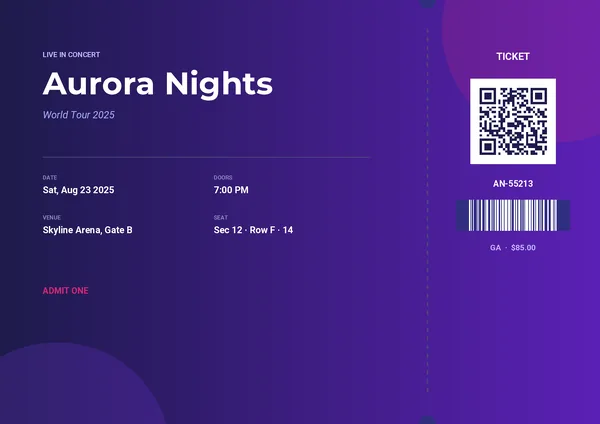
A concert-style ticket with a perforated stub, ready to scan at the door. Restyle it in the drag-and-drop editor, then generate one PDF per attendee from your app, your no-code tools or your AI assistant.
Basic planNeeded for the QR code and the barcode.
What's inside
A ticket ready for the door.
Event headline
A tagline, the name of the event and a subtitle on a gradient background.
Practical details
Date, doors, venue and seat, each in its own block.
Perforated stub
An “admit one” stub separated from the main ticket.
QR code
A code generated from the link of each ticket.
Barcode and price
A Code 128 barcode from the ticket code, with the ticket type and price.
Generate itSend the attendee.
Send the attendee.
Get the ticket.
One REST call per ticket. Every field below can come from your registration form or your shop.
event_taglineevent_nameevent_subtitleevent_datedoors_timevenueseatticket_codeticket_urlticket_typepricecurl -X POST https://pdfstork.com/api/v1/templates/YOUR_TEMPLATE_ID/generate \
-H "Authorization: Bearer YOUR_TOKEN" \
-H "Content-Type: application/json" \
-d '{
"data": {
"event_name": "Aurora Nights",
"event_date": "Sat, Aug 23 2025",
"venue": "Skyline Arena, Gate B",
"seat": "Sec 12 · Row F · 14",
"ticket_code": "AN-55213",
"ticket_url": "https://tickets.aurora/AN-55213"
},
"output": "url"
}'Your way in
Generate tickets with or without code.
Related